ICT Skills
A full ICT curriculum, practised hands-on — from your first click to university-level computer science. Pick a stage below to see its modules.
Prices and services
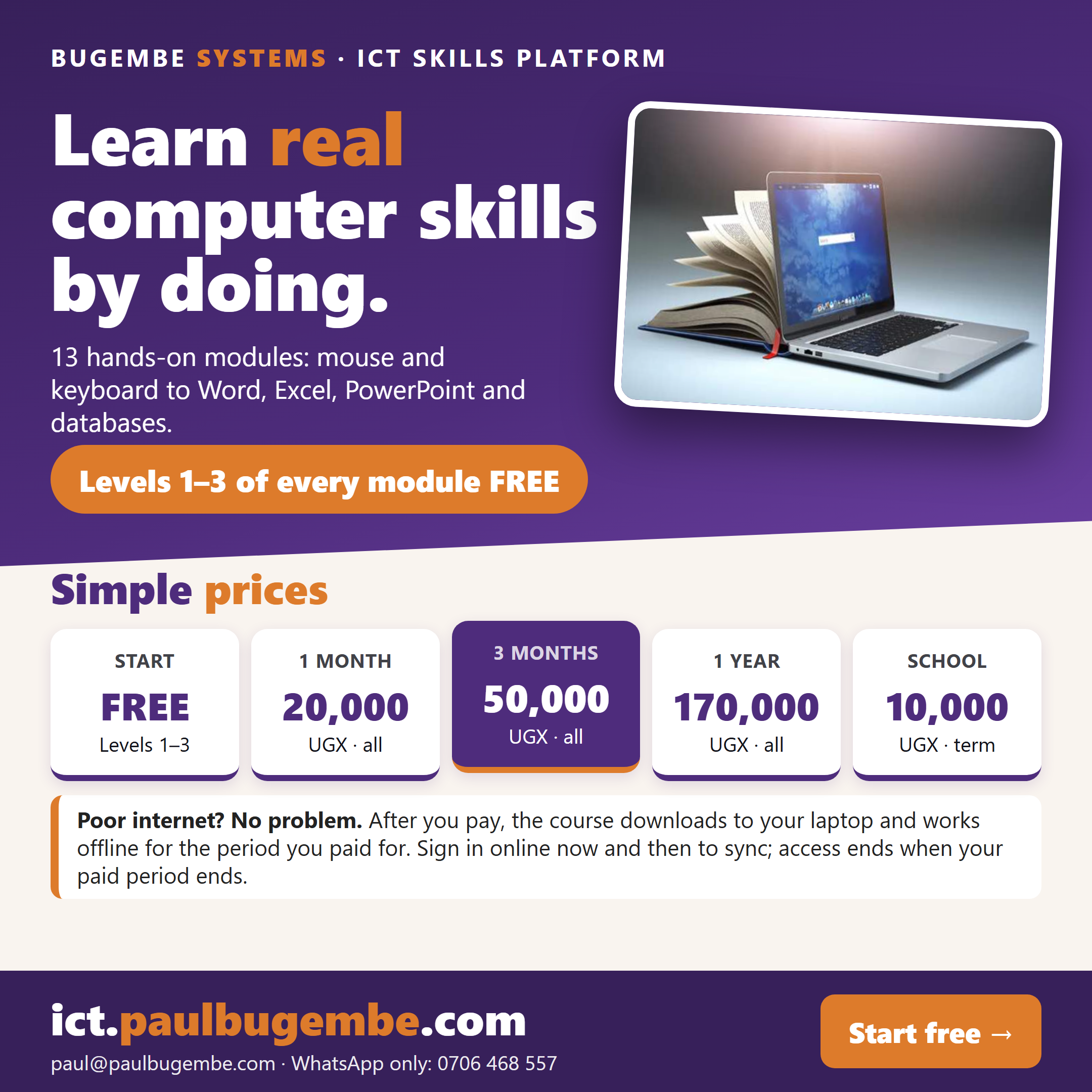
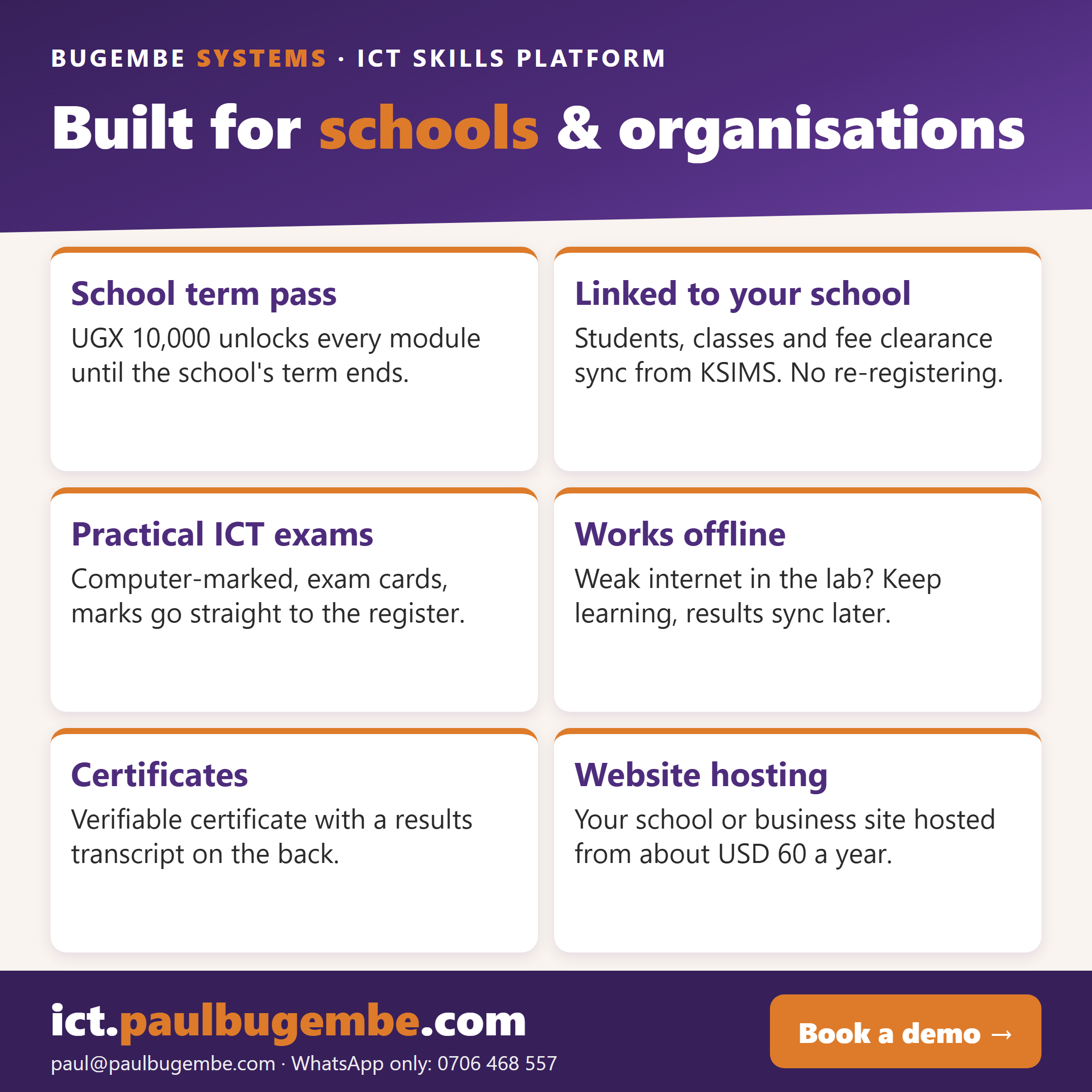
Levels 1–3 of every module are free. See the passes, and what we offer schools.
Stage 0Absolute Foundations7 of 7 modules live
The physical machine and everyday operation — mouse, keyboard, hardware, startup, windows, files, safety.
Computer, Mouse & Desktop Mastery
A complete pointing-device and desktop-navigation course: how to hold and move the mouse, single and double clicking, right-click context menus, drag-and-drop, selecting many items three different ways, precision and double-click timing, the scroll wheel, what every pointer shape means, the taskbar, Start menu and search, the system tray, notifications, arranging your desktop, running several programs, troubleshooting, and a final practical exam — practised on a simulated desktop with real drag-and-drop, alongside a live diagram of your own mouse.
Keyboard & Touch-Typing Mastery
A full touch-typing course: keyboard anatomy, posture, home row, every letter, common letter combinations, capitals, numbers, punctuation, symbols, accuracy and speed training, dictation, professional documents and data entry — with animated hands showing which finger types every key, and a Touch-Typing Profile tracking your speed, accuracy and weak keys.
Meet the Computer — Hardware Mastery
A complete course on the physical machine: what hardware is and the five jobs every device does, every part of a real desk setup, inside the system unit (motherboard, CPU, RAM vs. storage, drives, power and cooling), peripherals, ports and connectors practised by dragging real cables into real ports, laptop hardware, printers, reading specifications, choosing the right machine for a real need, maintenance and troubleshooting you actually fix on a bench — ending with a capstone where you assemble a computer from disconnected parts and power it on.
Turning It On — Startup, Login & Shutdown
The complete life of a computing session, on a real simulated machine: the eight power states and which one to choose; starting a computer and understanding every screen it shows you — self-test, manufacturer splash, loading, sign-in; accounts, passwords, Caps Lock, PINs and biometrics, landing on a real desktop; locking, signing out and switching users, with the same open document proving what survives each one; sleep, hibernate, the laptop lid and why restarting fixes things; shutting down safely, the unsaved-work warning and updates on shutdown; telling a frozen program from a frozen machine, rescuing one with Task Manager, and the forced shutdown done properly with its real cost; and four startup and sign-in faults fixed on the bench — ending with a capstone taking one machine through a whole working day, from cold and dark to correctly switched off.
Windows & Multitasking Mastery
A complete window-management and multitasking course: window anatomy, moving a window by dragging its title bar, resizing from all eight edges and corners, minimise/maximise/restore/close, Windows-11-style snap layouts with a live preview and a resizable shared border, several windows at once with real stacking and focus, a keyboard app-switcher you hold and cycle, window keyboard shortcuts, virtual desktops, the clipboard end to end (copy, cut and paste — files and text, keyboard and menu), personalisation and accessibility settings that genuinely restyle the desktop, dialog boxes, and rescuing a frozen program with Task Manager — ending with a capstone working session.
Files & Folders Mastery
A complete file-management course on a real simulated File Explorer: files, folders, drives and paths; five routes to any folder; building a folder structure; selecting one, many, a range or a dragged rectangle; copy, cut, move and drag between folders and across drives; renaming without losing the extension; the Recycle Bin, restoring and the drives that have no bin at all; list/icons/tiles/details views, sorting and real search with wildcards; filtering and file properties; what every common extension means; USB, external and cloud storage; Save As and the lost-file habit; compressing to ZIP and extracting; naming conventions; 3-2-1 backup — ending with three open-ended organisation capstones, including a genuinely messy Downloads folder graded on the filing system you produce.
Health, Safety & Good Habits
A complete practical-safety course on a real simulated workstation: setting up and correcting your desk (monitor distance and height, chair, feet, back) by adjusting it yourself, not just reading about it; eye care and the 20-20-20 rule; safe charging, handling and cleaning of a device, and Uganda-relevant dust and heat care; electrical safety around shared lab power strips, sockets and power cuts; safe headphone volume and hearing; digital wellbeing and real break habits for long sessions; shared-lab hygiene and reporting damage honestly — ending with a capstone taking one whole lab session from arriving to leaving, done safely.
Stage 1Digital Literacy & Office Productivity6 of 10 modules live
Real office software — word processing, spreadsheets, presentations, databases, the internet and web basics.
Word Processing I — Document Mastery
A complete document-production course in a real in-browser word processor: typing, selecting and editing; the clipboard, undo and redo; saving, Save As and five file formats; bold/italic/underline and effects; real font, size, colour and highlight pickers; alignment, line and paragraph spacing, indents and tabs; bulleted, numbered and multilevel lists; margins, orientation, paper size, page breaks, sections and columns; headers, footers and page numbers that count themselves; real tables you insert, type into, merge and format; pictures, shapes and text boxes you drag and resize on the page; links and symbols; real find and replace; a real spell checker on real misspellings; styles and themes; a navigation pane; footnotes and captions; a table of contents genuinely generated from your own heading styles, with working links; printing and PDF; comments, track changes and document protection — ending with three real documents marked on what you produce: a CV with a covering letter, a report, and an invoice.
Word Processing II — Working Like a Professional
Everything genuinely beyond Module 8's document mastery: real mail merge with a real recipient list — field-code view, Preview Results, a filter, and Finish & Merge genuinely producing one document per recipient; macros that record a real sequence of actions and replay it identically; fillable form content controls (text, checkbox, dropdown) and Protect Form, which locks a form's wording while leaving its own fields open; cross-references to real headings and captions that stay stale until you tell them to update, the same lesson a typed page number never learns; a real generated index built from marks left throughout the document, and a bibliography that lists only the sources you actually cited; master documents combining several real documents into one, in order; and a minimal real equation editor — fractions, exponents and roots built as genuine structure, not typed characters. Ends with a capstone: a real timetable notice merged to exactly the students it belongs to, marked on the document the merge actually produces.
Spreadsheets I — Getting Started
A real, functioning spreadsheet grid in your browser — not a mockup — with genuine A1-style cell addressing and a formula bar that shows exactly what you typed separately from the answer it computes: what rows, columns and cells actually are; entering, editing and navigating data with click, Enter and Tab; selecting single cells and dragged ranges; your first formulas — addition, subtraction, multiplication and division, built from real cell references rather than typed-in numbers, so a changed price or quantity updates every total that depends on it by itself; reading and fixing a #DIV/0! error; bold headers, currency formatting and cell borders applied to real cells and checked on the real result; and a capstone where you build a genuine price list — item, quantity, price and a formula-driven total — marked on the worksheet you actually produce.
Spreadsheets II — Formulas, Functions, and Charts
A real, functioning spreadsheet grid, taken from typed values to real analysis: SUM, AVERAGE, MAX and MIN over a range; the IF function making a real decision from a condition; copying a formula correctly with relative references that shift and absolute $-locked references that don't; sorting a table by any column and filtering rows without deleting anything; and real SVG bar, line and pie charts built straight from your own data, plus the judgement of which chart type actually fits a given question. Ends with a capstone: a real class results analysis — functions, a pass/fail column, sorting and a chart — marked on the worksheet you produce.
Electronic Presentations
A real, if simplified, slide editor in your browser: building a deck (add, duplicate, delete and reorder slides), choosing the right layout for the job, adding and formatting text and bullet points, inserting and positioning real images/shapes/text boxes, applying a theme that restyles the whole deck at once, per-slide or deck-wide backgrounds, transitions and animations used sparingly and consistently rather than a different flashy effect on every slide, speaker notes and a real Presenter View, and an honest look at what makes a slide easy or hard to actually present from. Ends with a capstone: a real product-pitch deck marked on the presentation you produce.
Databases — First Steps
A real, if introductory, table/query tool in your browser: what a database is and how it genuinely differs from a spreadsheet; the three words everything else builds on — tables, records and fields, each field carrying a real type (text, number, date, yes/no); designing a table's fields before entering a single record; adding, editing and permanently deleting real records; and real queries — sorting by any field without ever touching the data, filtering by a single condition (including text search with contains/starts-with), and combining two conditions with AND to narrow results further. Ends with a capstone: a real small database of your own design, marked on the table you actually build.
Coming next in this stage
- The Internet and Information Access
- Electronic Publishing and Basic Web Design
- Software, Files, and Basic Troubleshooting
- Staying Safe — System and Data Security, Ethics, and E-Waste
Stage 1.5Digital Workplace & EmployabilityComing soon
Skills people get hired and paid for — CVs, invoicing, Google Workspace, Canva, AI at work.
- Professional Documents
- CV and Resume Creation
- Job Applications Online
- Digital Office Administration
- Small Business Digital Skills
- Invoicing and Business Records
- Google Workspace
- Canva and Visual Communication
- Digital Marketing Basics
- AI for Everyday Work
- Online Business and Digital Payments
- Digital Research and Information Literacy
Stage 2Programming & Systems FundamentalsComing soon
Algorithms, real programming, data representation, networks, SQL and cybersecurity foundations.
- Thinking Like a Programmer — Algorithms and Pseudocode
- Programming Fundamentals I — Variables, Input/Output, and Control Flow
- Programming Fundamentals II — Functions, Lists, and Structured Programming
- Introduction to Object-Oriented Programming
- Data Representation — How Computers Actually Store Information
- Computer Systems and Architecture
- Computer Networks Fundamentals
- Relational Databases and SQL
- Cybersecurity Fundamentals
- Ethics, Impact, and Emerging Technologies
Stage 3Advanced & University-Level CSComing soon
Data structures, algorithms, operating systems, databases, software engineering, AI/ML and the cloud.
- Data Structures
- Algorithms and Complexity
- Operating Systems
- Advanced Computer Networks
- Database Systems — Design and Transactions
- Software Engineering and the Development Life Cycle
- Discrete Mathematics for Computing
- Artificial Intelligence and Machine Learning Fundamentals
- Cloud Computing Fundamentals
Stage 4Specialization & CapstoneComing soon
Choose a track and build a real capstone project to show for it.
- Choose Your Specialization Track
- Capstone Project
Every module's first few levels are free to try — paid levels unlock the rest, one level at a time or as a whole module. Completing a level earns a Skill Badge: skill-building and self-assessment, not a certification or formal qualification.